
Declare and lodge your submission
The Review step is where you sign off on the month. You can either submit a draft or make your final submission, and each option has a different outcome.
Before you start
Plan: Available on all plans.
- Permissions: A final submission can only be made by a recognised GPMS submitter. You need your GPMS federated email and federated ID. See Roles and permissions.
Submit a draft
Use this option while you are still working on the month. The draft is sent to GPMS with the status In progress, so the Department can see it, but it is not your final return. You can return and make changes at any time before your final submission.
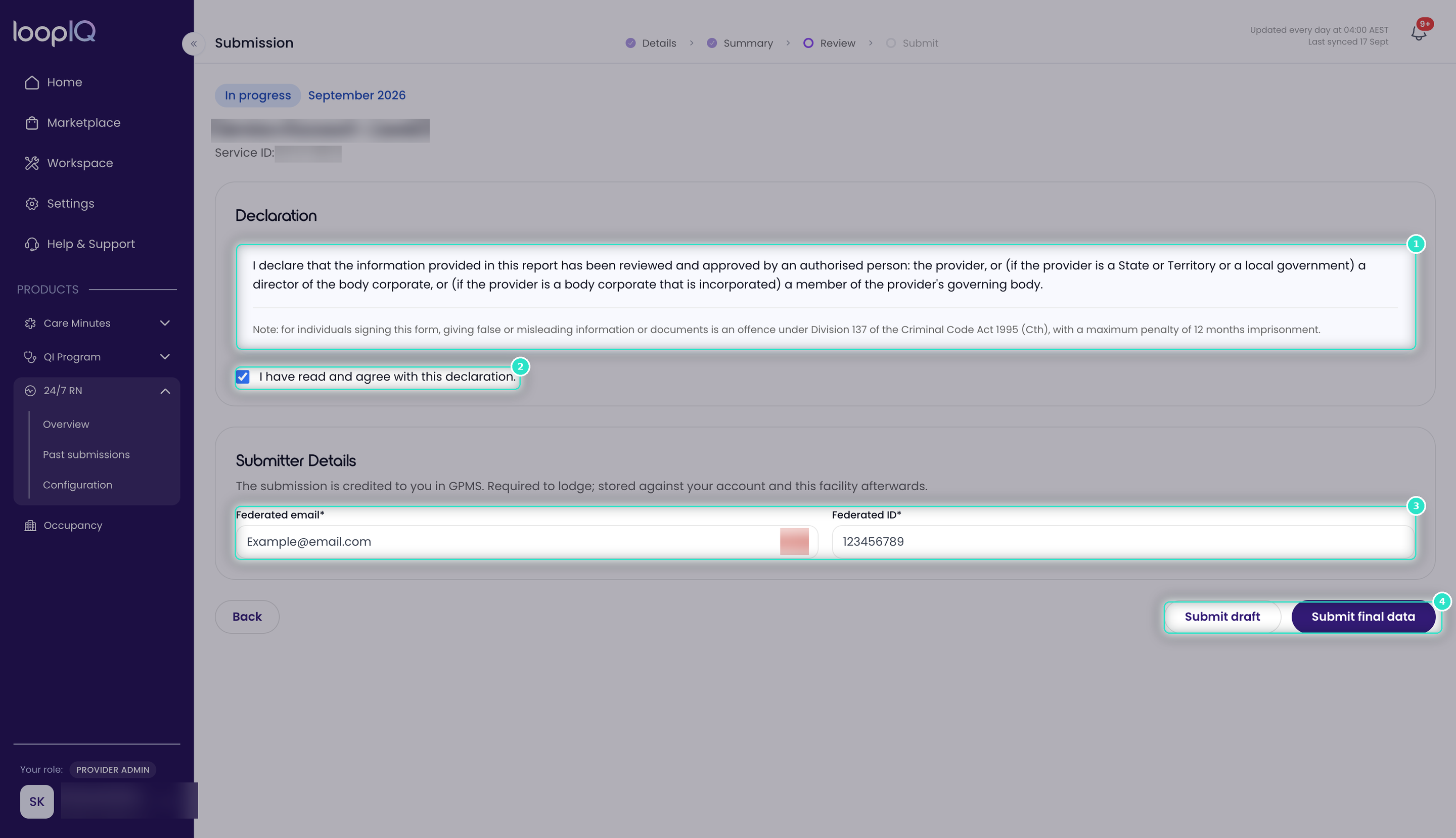
- Read the Declaration (1) in full.
- Select I have read and agree with this declaration (2).
- Click Submit draft (4).
Make your final submission
This option lodges the month to GPMS. It is the submission the Department receives.
- Read the Declaration (1) in full.
- Select I have read and agree with this declaration (2).
- Enter your Federated email and Federated ID (3).
- Click Submit final data (4).
The Submit step opens with your confirmation.
Important: Your final submission must be lodged before the reporting period closes at 11:59 pm AEST. A month lodged after this time is marked as a Late submission, and you cannot submit the following month until it has been lodged. If your facility receives the 24/7 RN supplement, you may also lose the supplement for that month, so make sure any draft is finalised and lodged in time.
Important: Giving false or misleading information or documents is an offence under Division 137 of the Criminal Code Act 1995 (Cth), with a maximum penalty of 12 months' imprisonment.
Was this article helpful?
Can't find what you are looking for?
Loop IQ customers - log a support ticket.
Not yet a customer? Email our support team.
 Log a support ticket
 support@loopiq.com.au