
Record an absence
When an RN was not on site, the Department requires details of the cover arrangements in place. Loop IQ presents these questions one day at a time, using the Department's own wording.
Before you start
Plan: Available on all plans.
- Requirements: At least one day must be marked as RN absent.
Answer the four questions
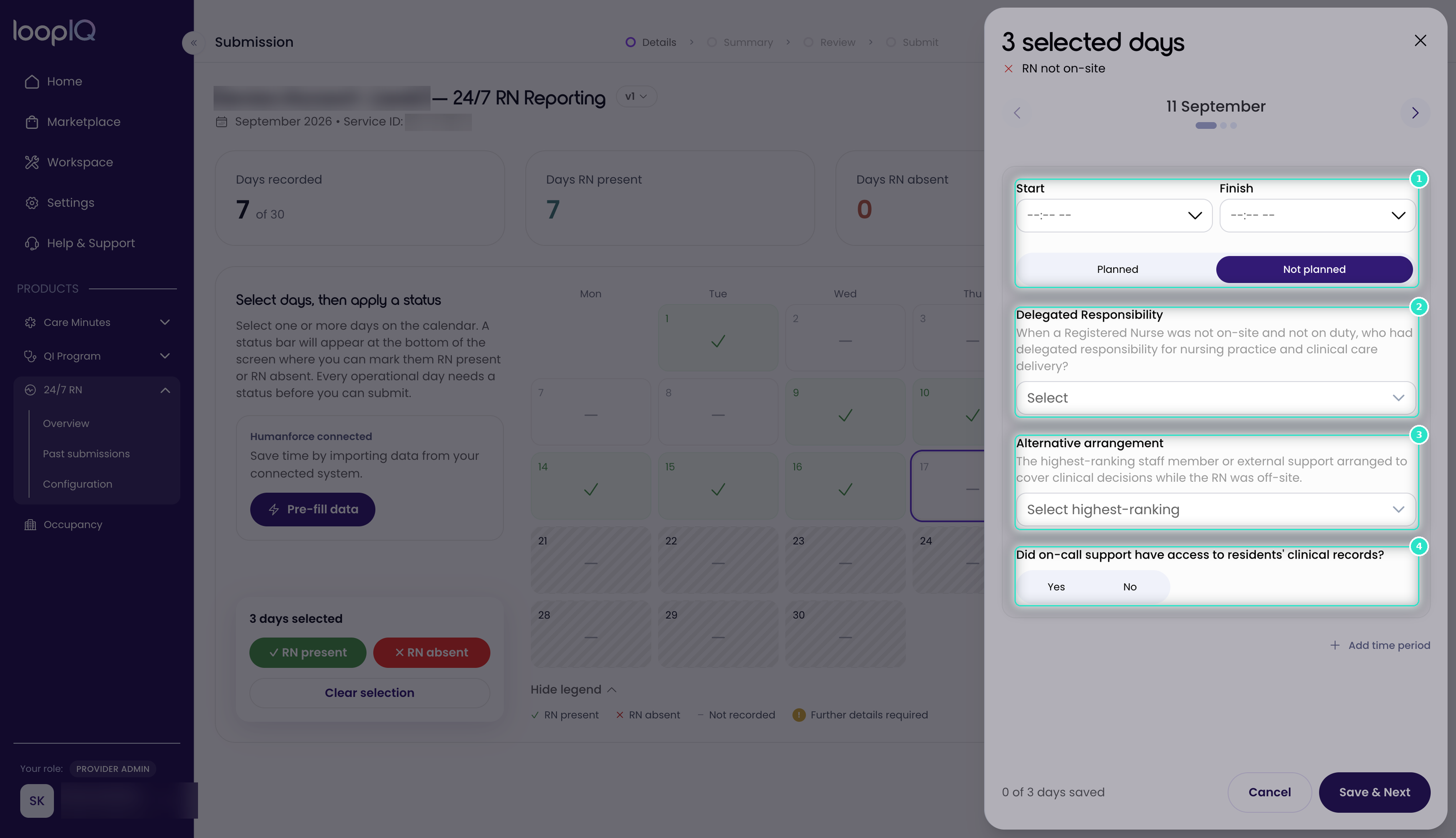
- Enter the Start and Finish times for the period without an RN on site, then select Planned or Not planned (1).
- Under Delegated Responsibility (2), select who held responsibility for nursing practice and clinical care delivery.
- Under Alternative arrangement (3), select the highest-ranking cover arrangement that applied.
- Answer Did on-call support have access to residents' clinical records? (4).
- Click Save & Next.
Once all four questions are answered, the day's status changes from Further details required to RN absent.
Note: The counter at the bottom of the panel shows how many of your selected days have been saved.
Was this article helpful?
Can't find what you are looking for?
Loop IQ customers - log a support ticket.
Not yet a customer? Email our support team.
 Log a support ticket
 support@loopiq.com.au