
View a facility's occupancy
Occupancy is reported one facility at a time, so the page stays empty until you select one.
Choose the facility you want to see. Occupancy shows one facility at a time, from Occupancy in the left menu.
Before you start
Plan: Available on all plans.
- Access: Occupancy must appear in your left menu.
- Facilities: you must be assigned at least one facility.
- PRODA: the facility needs PRODA configured and connected. Without it, the page shows no data.
Choose a facility
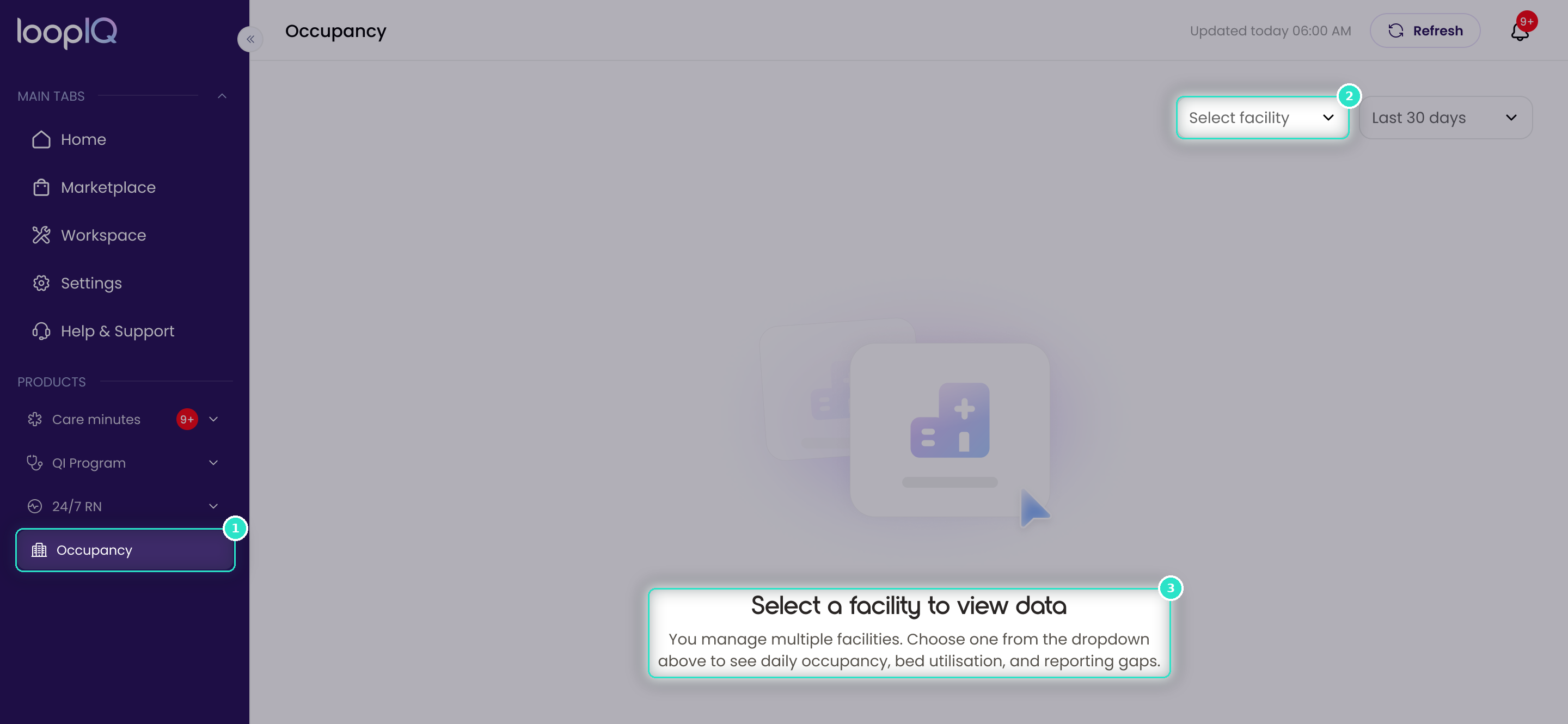
- From the left menu, click Occupancy (1).
- At the top right, click the Select facility dropdown (2).
- Click the facility you want.
Until you choose, the page reads Select a facility to view data (3). Once you choose, the heading names the facility and the figures, chart and period fill in.
There's no all-facilities view. Use the dropdown to move between facilities.
Important: Updated today 06:00 AM is when Loop IQ last refreshed from Services Australia, not the last day of data. Refresh won't bring newer days that Services Australia hasn't reported.
For more on choosing which days you see, see Change the reporting period.
Was this article helpful?
Can't find what you are looking for?
Loop IQ customers - log a support ticket.
Not yet a customer? Email our support team.
 Log a support ticket
 support@loopiq.com.au