
Find an integration
The Integrations page lists every system Loop IQ can connect to, grouped by the type of data each supplies. Open it from Workspace, on the Configuration & integrations tab.
Before you start
Plan: Available on all plans.
- Access: the View integration configurations permission is required. See About Integrations.
Open the Integrations page
- From the left menu, click Workspace.
- Click the Configuration & integrations tab (1).
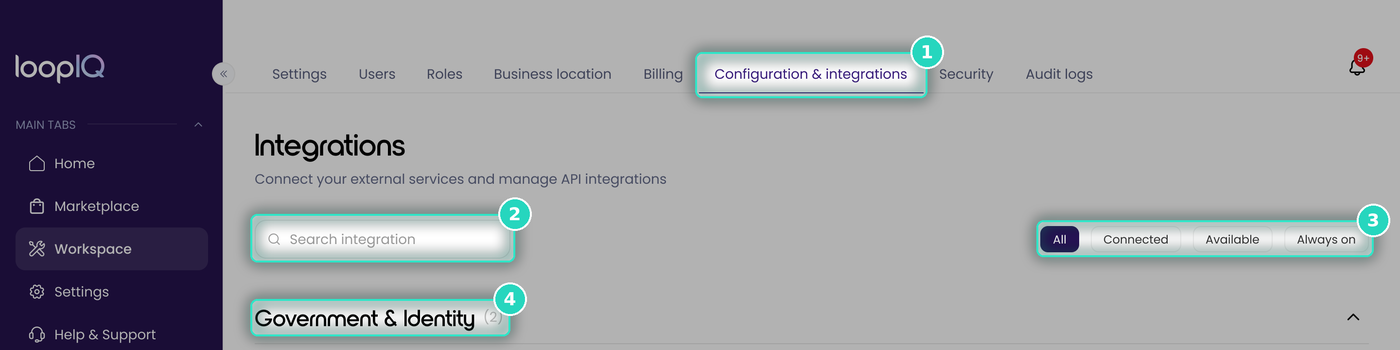
The page opens with all categories expanded and the All filter selected.
Narrow the list
- Search integration (2): enter a system's name, or a word from its description or tags. For example, medic returns BestMed by name and Telstra Health by its Medication tag.
- Status filters (3): show one status at a time: All, Connected, Available, and Always on.
- Categories (4): each heading shows the number of integrations it contains, and can be collapsed.
When no integrations match, the page displays No integrations match your search.
Categories
- Government & Identity: Services Australia and the Department of Health.
- Data & Benchmark: benchmark reference data.
- Workforce management: rostering, timesheet and payroll systems.
- Clinical & Pharmacy: clinical record and medication systems.
- Finance & ERP: finance systems.
Each category ends with a Don't see your system? card. To request a system that is not listed, click Request an integration on this card. See Request an integration.
For more on the status shown on each card, see Integration statuses explained.
Was this article helpful?
Can't find what you are looking for?
Loop IQ customers - log a support ticket.
Not yet a customer? Email our support team.
 Log a support ticket
 support@loopiq.com.au