
Submission statuses explained
Each facility on the Overview page shows a submission status for the month you are viewing. The status shows how far the month has progressed and whether anything has been sent to the Department.
Before you start
Plan: Available on all plans.
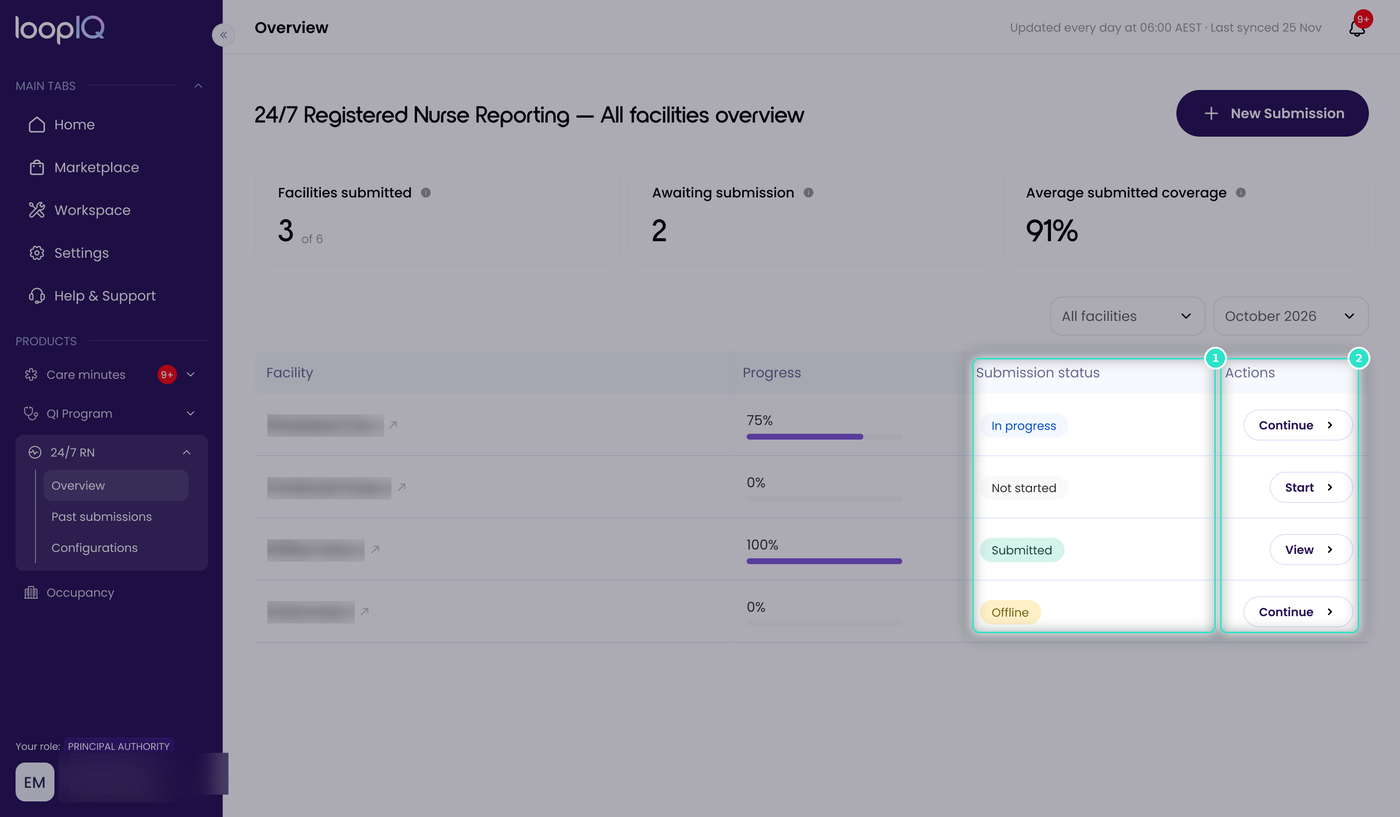
The status appears in the Submission status column (1), and the available action changes to match it (2).
Not started
No days in the month have been given a status, and nothing has been sent to GPMS. The available action is Start.
Offline
Days have been recorded in Loop IQ, but nothing has been sent to GPMS. The month exists in Loop IQ only. The available action is Continue.
In progress
A draft has been submitted to GPMS. The Department can see the month as in progress, but it is not your final return and does not meet your reporting obligation. The available action is Continue.
Submitted
The final submission has been lodged with GPMS, and the month is complete. The available action is View.
Important: Every month must reach Submitted before the due date. If a month is still Not started, Offline or In progress when the reporting window closes, it is marked as a Late submission, and you cannot submit the following month until it has been lodged. If your facility receives the 24/7 RN supplement, you may also lose the supplement for that month. Take particular care with In progress, as a draft in GPMS can look finished when it is not.
Was this article helpful?
Can't find what you are looking for?
Loop IQ customers - log a support ticket.
Not yet a customer? Email our support team.
 Log a support ticket
 support@loopiq.com.au