
View a day's history
Loop IQ keeps a record of every change to each day’s status. This shows whether a day’s status came directly from your workforce management system, or was corrected manually afterwards and by whom.
Before you start
Plan: Available on all plans.
- Requirements: You need an open submission with at least one day recorded.
Check a day’s history
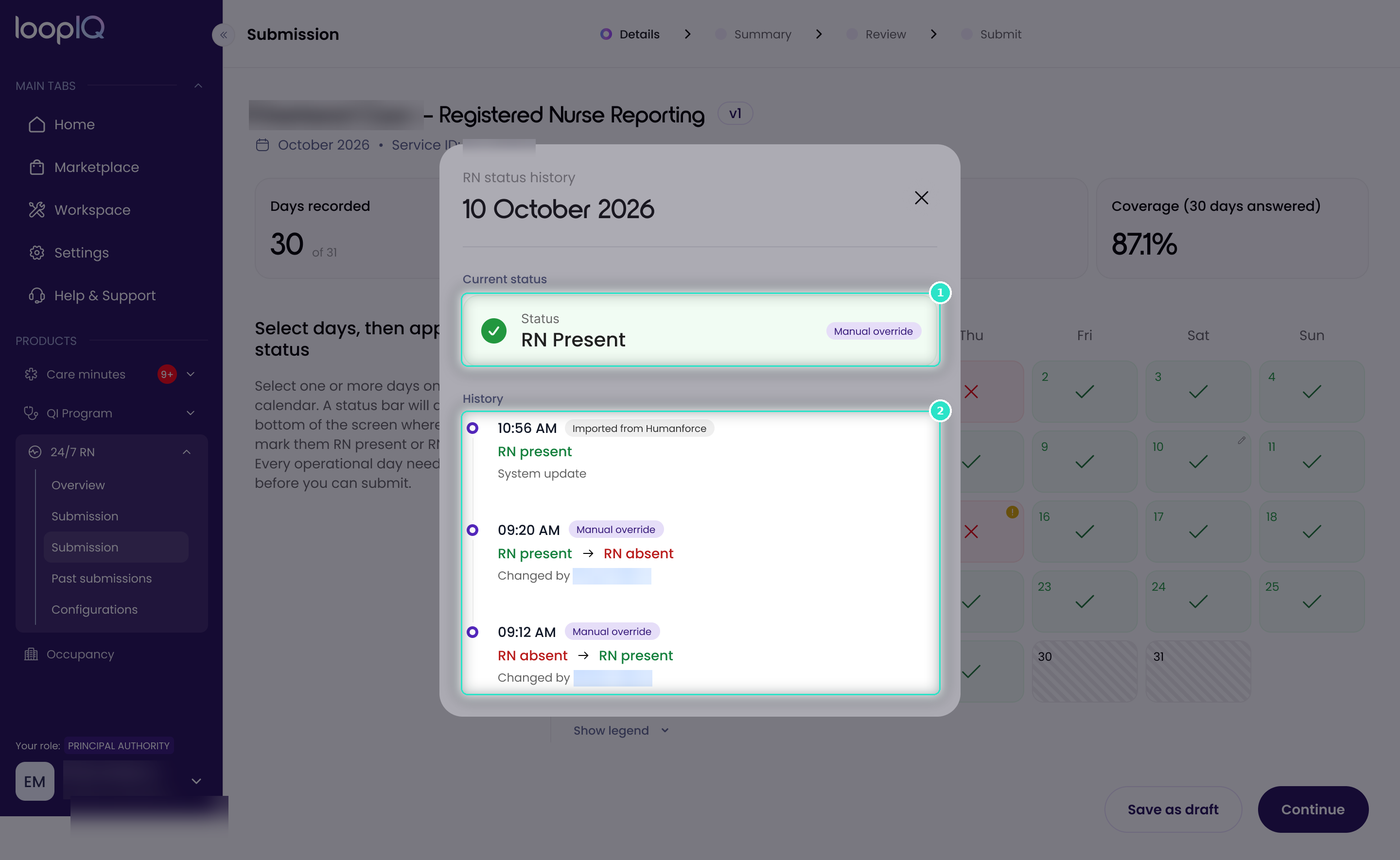
- Open the day you want to check. Current status (1) shows the day’s status now, and whether it was set by an import or manually.
- Review History (2). Each entry represents one change, listed from newest to oldest, with the time it was made.
Each entry shows what changed and who changed it:
- Imported from your workforce management system (for example, Imported from Humanforce) the change came from an import and is attributed to the system rather than a person.
- Manual override: the change was made manually. The entry shows the previous and new status, such as RN present → RN absent, and names the person who made it.
Was this article helpful?
Can't find what you are looking for?
Loop IQ customers - log a support ticket.
Not yet a customer? Email our support team.
 Log a support ticket
 support@loopiq.com.au