
Set up your data source
Before you can open a 24/7 RN submission for a facility, you need to configure its data source. Loop IQ uses this source to build each month's coverage record, so submissions are unavailable until it is set up.
Before you start
Plan: Available on all plans. Automated reporting requires a paid plan.
- Permissions: You need a role that can manage integration configurations, such as Admin.
- Integration: If you choose Automated, your workforce management system must already be connected to Loop IQ.
Set up your data source
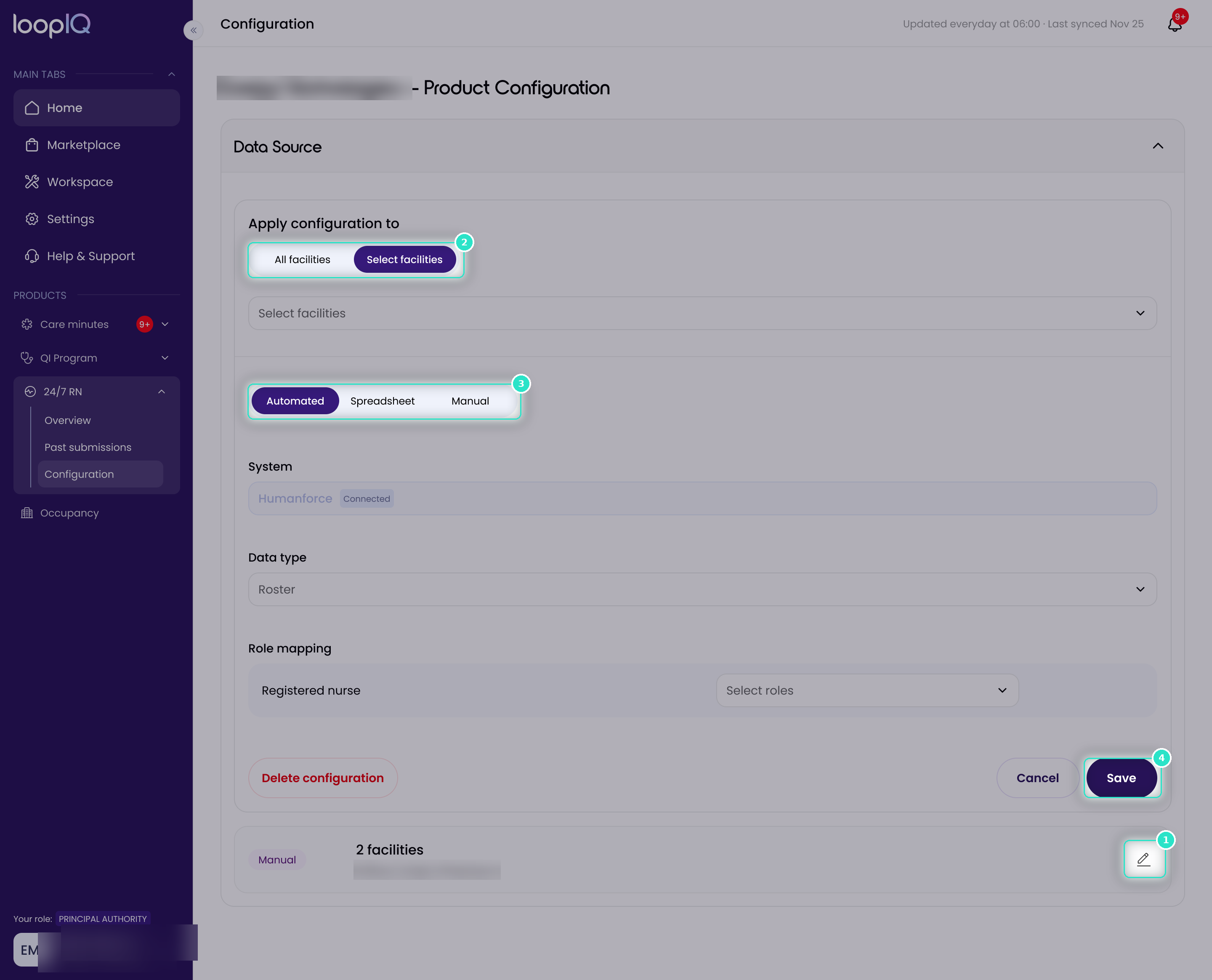
- From the left menu, click 24/7 RN, then select Configuration.
- On the Data Source panel, click the edit control (1).
- Under Apply configuration to, choose All facilities or Select facilities.
- Choose your source (2): Automated, Spreadsheet or Manual.
- Complete the fields for your chosen source, as described below.
- Click Save (3).
All settings on this page save together, so if you chose Automated, map your roles before you save.
Note: a facility with no data source cannot start a submission. Set one up before you begin.
Automated
Confirm your connected System, then choose a Data type. Attendance data is imported from your connected workforce management system overnight, and each month’s submission fills in automatically as the month progresses.
Spreadsheet
Click Download template, then complete the coverage template on your computer. Upload the completed template on the submission page. You can upload as often as needed during the month.
Important: Only .xlsx files that match the Loop IQ template are accepted. Do not change the template’s structure, and do not replace it with a roster exported from another system, as Loop IQ will not be able to read it.
Manual
You record each day’s status yourself. No rostering data is used, so there is nothing further to configure.
Was this article helpful?
Can't find what you are looking for?
Loop IQ customers - log a support ticket.
Not yet a customer? Email our support team.
 Log a support ticket
 support@loopiq.com.au